by: Anas Khan
-
August 10, 2026
-
Comments (0)
Quick answer: The Google Ads August 17 bidding update stops campaigns marked “Limited by budget” from quietly outperforming their Target CPA or Target ROAS settings. Starting August 17, 2026, Smart Bidding will instead optimize these campaigns toward the exact number sitting in your target field — not the better number they’ve secretly been delivering. Your budget cap won’t increase on its own, but if your real cost per conversion has been running below your target (or your ROAS above it), that cushion is about to disappear, which usually means a higher CPA or lower ROAS for the same spend. Google’s in-account Bid Target Adjustment Tool, live since July 6, 2026, is where you decide how to respond before the change lands.
On June 15, 2026, Google Ads Liaison Ginny Marvin announced three bidding and budgeting changes on LinkedIn. Two were opt-in features advertisers could try or skip. The third wasn’t optional, and it’s the one that has dominated PPC conversation ever since: starting August 17, 2026, campaigns running Target CPA or Target ROAS bidding will stop quietly beating their own targets once they hit a budget limit.
That sounds like a minor technical footnote. For one very specific and very common type of account, it isn’t: any “Limited by budget” campaign that’s been converting well below its stated CPA, or well above its stated ROAS, for months without anyone touching a setting. Given how many accounts run exactly this way, that’s not a small group.
Here’s the actual mechanism behind the change, why Google ended up clarifying its own announcement more than once, and what’s genuinely worth checking in your account before the Google Ads August 17 deadline — which matters less as a compliance cutoff than as the last point where you, not Google’s system, get to decide what your target number means.
What's Actually Changing on August 17
Today, when a Target CPA or Target ROAS campaign runs into its budget cap, Smart Bidding does something most advertisers never notice: it gets choosy. Instead of competing in every auction that might convert, it leans toward the cheapest, highest-probability opportunities first. The side effect is a campaign that often beats its own target by a wide margin, a $60 Target CPA campaign quietly converting at $38, or, in a typical ecommerce PPC account, a 250% Target ROAS campaign actually returning closer to 430%.
Google has described this as an unintended consequence of how budget limits interact with Smart Bidding, not a deliberate feature. Starting August 17, 2026, and rolling out over several weeks, that selective behavior goes away for affected campaigns. Smart Bidding will instead optimize consistently toward whatever number is actually sitting in your target field, whether or not that number still reflects where your account performs today.
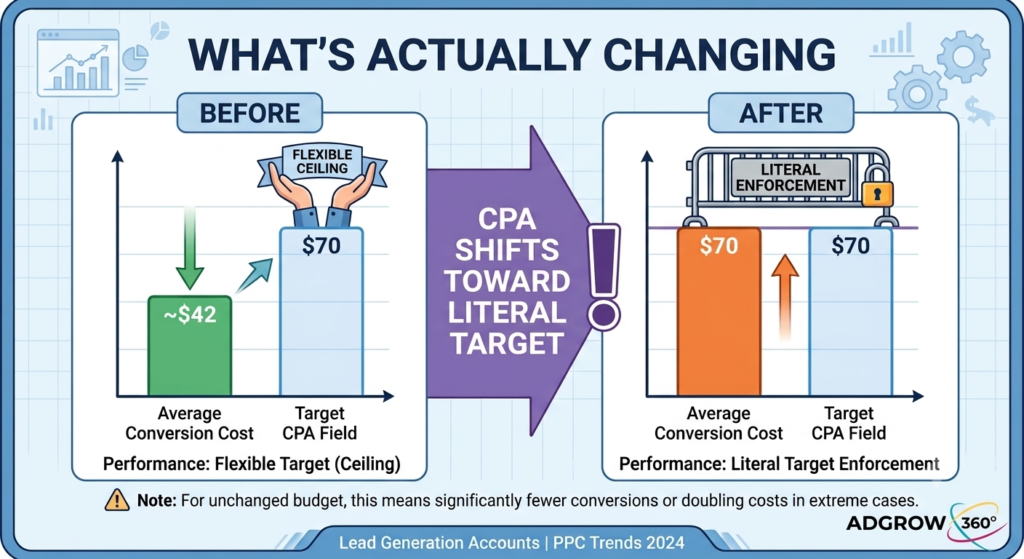
Take a lead-gen account with a Target CPA of $70 that’s been converting close to $42 for the past several months. Once the rollout reaches that account, and assuming nothing changes, actual CPA moves toward something much closer to $70 — for an unchanged monthly budget, that’s meaningfully fewer conversions, or conversions costing well over half again as much. For accounts where the gap between stated target and real performance has been especially wide, some PPC commentators have pointed to cases approaching a full doubling of cost per result. Nobody adjusted the budget in either scenario. The number that was always sitting in the target field simply started getting enforced literally instead of treated as a loose ceiling.
Why "Efficient" Is in Quotes
This is the part most coverage skips past, and it’s really the entire point: Google isn’t proposing to spend more of your money. The company has been explicit that daily and monthly budget caps stay exactly where you set them, and that it won’t touch anyone’s targets or budgets automatically. On paper, nothing about your invoice changes.
What changes is the outcome you get for that invoice. A campaign quietly beating its target was, in practical terms, a more efficient use of budget than the account’s own settings claimed it would be. August 17 removes that hidden margin. You keep paying the same amount; you’re likely to get less for it unless you step in first. It’s a quieter, policy-driven version of a trap that catches accounts for plenty of other reasons too — ad spend that stops delivering what it used to, without anyone noticing until the numbers get reviewed. That’s the entire mechanism behind campaigns that look “efficient” today turning ordinary — or genuinely expensive on a per-result basis — the moment the update reaches them.
Which points to the one question worth asking about every affected campaign, and it matters more than anything in Google’s own help documentation: is the gap between your target and your real performance sitting there on purpose, or is it just an old number nobody has revisited since launch?
Those two situations call for opposite responses, and mixing them up is where most of the current anxiety comes from.
- If you deliberately set a loose Target ROAS or a generous Target CPA to give Smart Bidding room to explore unfamiliar audiences rather than only remarket to people who were always going to convert, August 17 takes that lever away. You’ll need to either accept a tighter, more literal target or find another way to fund that exploration.
- If the target is simply stale — set a year ago, never revisited, sitting well above what the account actually needs today — August 17 is closer to forced housekeeping. Updating the number to match current reality avoids any real disruption at all.
Most accounts are some mix of both, campaign by campaign, which is exactly why “update every target” and “change nothing” are both the wrong blanket answer.
Which Campaigns Are Actually in Scope
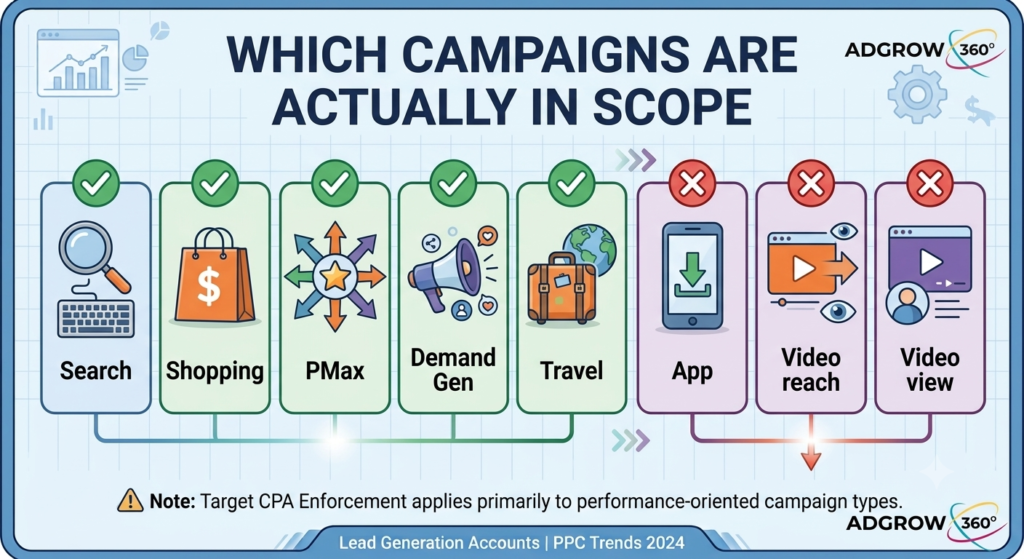
The update is narrower than the loudest reactions online suggest, but the fine print decides whether it touches you.
| Campaign type | Affected on August 17? | Notes |
|---|---|---|
| Search | Yes | Only if using Target CPA/ROAS and “Limited by budget” |
| Shopping | Yes | Same conditions |
| Performance Max | Yes | Spend allocation across channels inside PMax may also shift as a side effect |
| Demand Gen | Yes | Includes Demand Gen line items managed separately in Display & Video 360 |
| Travel | Yes | Same conditions |
| Display | No shift | Already optimizes this way today |
| Hotel | No shift | Already optimizes this way today |
| App campaigns | Excluded entirely | Not part of this update |
| Video reach campaigns | Excluded entirely | Not part of this update |
| Video view campaigns | Excluded entirely | Not part of this update |
Two conditions both have to be true for a campaign to move: it has to run Target CPA or Target ROAS specifically, and it has to be currently, or recently, flagged “Limited by budget.” Maximize Conversions and Maximize Conversion Value campaigns aren’t touched by this at all, target or no target, because they were never optimizing against a fixed number the way Target CPA/ROAS strategies do.
Why Google Says It's Doing This
None of this arrived completely out of nowhere bidding and budgeting changes had been flagged as likely follow-ups since Google Marketing Live back in May 2026. Google’s stated reasoning is about predictability, not revenue: under the old behavior, raising the budget on an over-performing, budget-limited campaign could produce inconsistent results, because the gap between target and actual performance was never a stable buffer, it was a byproduct of exactly how budget-constrained the campaign happened to be at any given moment. Google’s argument is that once campaigns optimize consistently to their real, stated target regardless of budget, advertisers can scale spend with a result they can actually model in advance, instead of guessing.
That reasoning holds up well for an advertiser scaling against a genuinely current target. It holds up far less well for an advertiser who was, whether they realized it or not, relying on the old cushion as free performance.
The Pushback: Why PPC Professionals Are Frustrated
Google’s own framing centered on predictability and scaling the explanation above. That’s not the version that spread first. Joey Bidner, a freelance Google Ads consultant, wrote a pointed LinkedIn post arguing this ranks among the more Google-favoring changes he’s encountered in years of managing accounts; it drew 71 reactions and 27 comments within days. His reasoning: several of his top-performing accounts are deliberately configured with a generous CPA ceiling or a modest ROAS floor, on purpose, because that slack is exactly what lets Smart Bidding branch out toward unfamiliar audiences instead of endlessly re-serving people who were always going to convert.
The debate escalated when another practitioner, Maggie Humphrey, an ecommerce director at the agency Cypress North, pushed Ginny Marvin directly in the same LinkedIn thread: if this genuinely only affects “Limited by budget” campaigns, why does Google’s own framing describe it as changing bidding behavior more broadly to create predictable performance? Marvin’s answer was that unconstrained campaigns already optimize strictly to their stated target today, this change simply brings budget-constrained campaigns in line with behavior that already exists everywhere else in the system. Greg Finn, an agency principal at Cypress North who co-hosts the Marketing O’Clock podcast, worked through the same exchange on air and came away unconvinced the explanation was fully consistent the two things Google had told different people in the thread, he argued, could only both be true if two separate systems were actually at work.
Google has since restated, more than once, that the change is exactly as narrow as its documentation says, and that it won’t adjust anyone’s targets or budgets on its own. That hasn’t closed the argument. Theories are circulating that aren’t confirmed but are worth knowing about: one holds that the change will nudge out the roughly 10–15% of advertisers unwilling to adopt new targets, freeing up auction share for everyone who does adapt; another frames it as the opening move in a wave of “let us help you fix this” outreach from Google account reps once budget-limited accounts start showing volatility. Treat both as things to watch for, not as settled fact.
Don't Confuse This With Two Other Changes From the Same Announcement
Google bundled the August 17 shift together with two unrelated updates, and mixing any of them up with the core change is a common, avoidable mistake:
- Smart Bidding Exploration is now available globally for Performance Max, opening up a capability that used to be limited to fewer advertisers. This is a new option to opt into, not a forced change to existing campaigns.
- Promotion mode, still in beta for Search and Performance Max, gives advertisers a way to temporarily raise their ROAS tolerance and daily budget around planned high-demand windows, like a seasonal sale. Also opt-in.
- Google separately relabeled how bid strategies display inside the interface — “Maximize conversions with a Target CPA” now simply reads “Target CPA,” and “Maximize conversion value with a Target ROAS” now reads “Target ROAS.” This is a display-name change only. It has no effect on how bidding actually works, but its timing has led plenty of advertisers to assume it’s connected to the real change.
If a bid strategy in your account shows a new, shorter name, that alone tells you nothing about whether the August 17 behavior shift applies to it. Check the campaign’s actual budget status and bid strategy, not just its label.
How to Prepare Before August 17
- Pull every campaign running Target CPA or Target ROAS across Search, Shopping, Performance Max, Demand Gen, and Travel, and note which ones currently show, or have recently shown, “Limited by budget” status.
- Compare the stated target to actual recent performance on each one. The wider the gap, the bigger the shift to expect.
- Diagnose the gap before changing anything. Was the target set loose on purpose to encourage exploration, or has it simply gone stale? The answer decides whether you adjust it, leave it, or switch strategies entirely.
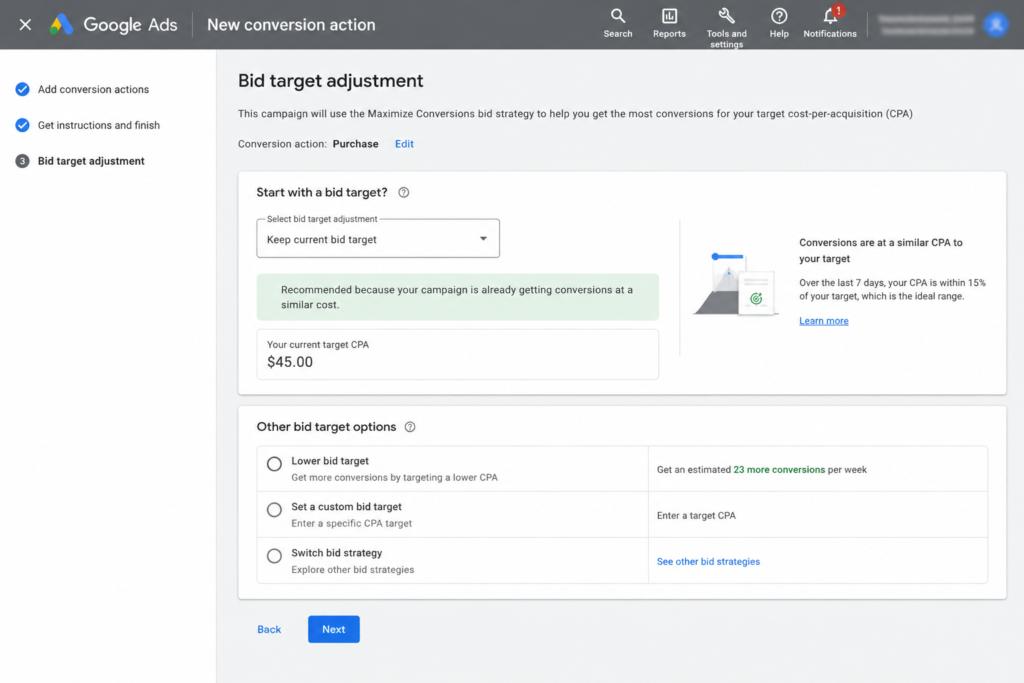
- Open the Bid Target Adjustment Tool, live in-account since July 6, 2026, and either update the target to match recent delivery, set a new custom figure, or leave it as-is and accept the drift.
- Consider Maximize Conversions or Maximize Conversion Value for campaigns where raw volume matters more than a fixed CPA or ROAS ceiling — this removes the target constraint entirely.
- Check beyond the standard Google Ads dashboard. The same change reaches Search Ads 360, Display & Video 360, Google Ads Editor, and the Google Ads API, and Demand Gen line items inside DV360 received their own separate notice carrying the identical deadline. An audit confined to one console can miss exposed targets sitting in another.
- Mark the date on your reporting calendar. If a client or stakeholder spots a CPA jump in late August, you want to be the one explaining it before they ask.
- Look at what you can control downstream, too. If your CPA does move up, a better landing page conversion rate is one of the few levers that offsets it without touching Google’s bidding logic at all — see our landing page optimization guide for where to start.
What Happens After August 17
Google’s own guidance is to wait one to two full conversion cycles before judging results in the bid strategy report, since Smart Bidding needs a re-learning period to settle into the new behavior. For a fast-moving e-commerce account, that might mean a noisy week or two. For a lead-gen account with a multi-week sales cycle and offline conversions imported from a CRM, “one to two conversion cycles” can realistically stretch to four to six weeks before the numbers reflect anything stable. Google has also flagged that Performance Planner forecasts may run unreliable between August 17 and the end of the month, so treat any forecast pulled during that window with some skepticism.
What Advertisers Are Predicting Next
Google’s own guidance is to wait one to two full conversion cycles before judging results in the bid strategy report, since Smart Bidding needs a re-learning period to settle into the new behavior. For a fast-moving e-commerce account, that might mean a noisy week or two. For a lead-gen account with a multi-week sales cycle and offline conversions imported from a CRM, “one to two conversion cycles” can realistically stretch to four to six weeks before the numbers reflect anything stable. Google has also flagged that Performance Planner forecasts may run unreliable between August 17 and the end of the month, so treat any forecast pulled during that window with some skepticism.
Key Takeaways
- The Google Ads August 17 bidding update rolls out gradually starting August 17, 2026 — it won’t flip for every account overnight.
- It only affects Target CPA and Target ROAS campaigns currently or recently marked “Limited by budget,” across Search, Shopping, Performance Max, Demand Gen, and Travel.
- Your budget cap does not increase automatically — what changes is how much that same budget actually delivers.
- The real fix is a short account review, not a rebuild: open the Bid Target Adjustment Tool, work out whether your gap is deliberate or stale, and act before August 17.
Frequently Asked Questions
Will my Google Ads budget increase automatically because of the August 17 update? No. Google has stated directly that daily and monthly budget caps are unaffected and won’t change on their own. What can change is how much that fixed budget actually delivers — your cost per conversion may move closer to your stated target.
Does this affect Maximize Conversions or Maximize Conversion Value campaigns? No. Only campaigns explicitly running Target CPA or Target ROAS bidding are in scope. Maximize Conversions and Maximize Conversion Value campaigns, with or without a target attached, operate differently and sit outside this specific change.
My bid strategy now shows as just “Target CPA” instead of “Maximize conversions with a Target CPA” — is that the same update? No. That’s a separate, cosmetic renaming that rolled out around the same time and only changes how the strategy name displays. It has no effect on actual bidding behavior. Don’t assume a renamed strategy has already been affected by the August 17 change — check its real budget status and performance instead.
What happens if my campaign isn’t currently marked “Limited by budget”? Campaigns that aren’t budget-constrained already optimize strictly toward their stated target today, so they shouldn’t see a shift from this update at all. The exposure is concentrated entirely in campaigns that are currently, or have recently been, budget-limited.
Are Performance Max campaigns included in this change? Yes, if a given Performance Max campaign runs Target CPA or Target ROAS and carries a “Limited by budget” status. Google has also noted that spend allocation across channels inside Performance Max may shift as a secondary effect.
Where do I actually find the Bid Target Adjustment Tool? It appeared inside Google Ads accounts starting July 6, 2026, tied to notifications sent to advertisers whose campaigns carried a “Limited by budget” status at any point over the prior twelve months while running an affected strategy. If you manage accounts through Search Ads 360 or Display & Video 360, check those platforms separately — the standard Google Ads dashboard won’t necessarily surface everything.
Is Google making this change to increase its own ad revenue? Google’s official position is that this is about consistency and predictability when scaling budgets, not about extracting more spend, and that it won’t adjust anyone’s targets or budgets on its own. A number of PPC practitioners remain skeptical of that framing, especially given that the impact concentrates on campaigns that were already outperforming. Both the official rationale and the skepticism are worth keeping in mind — either way, the practical response is the same: check your own account numbers rather than leaning on either narrative.
How long until my campaign performance stabilizes after the change takes effect? Google recommends waiting one to two full conversion cycles before evaluating results in the bid strategy report. For accounts with short, fast conversion paths, that could mean just days. For lead-gen accounts with longer sales cycles or offline conversion imports, plan for closer to a month before the data is fully trustworthy again.
Google’s messaging on this update will likely keep shifting between now and August 17, and possibly afterward, as real accounts start reporting what actually happened. Treat everything above as the picture as of late July 2026, confirm it against your own Bid Target Adjustment Tool notifications, and don’t assume a quiet campaign today stays quiet in September. If auditing every affected campaign isn’t something you have time for in-house, it’s worth knowing what bringing in a Google Ads agency typically costs before the deadline, not after.