by: Anas Khan
-
November 13, 2026
-
Comments (0)
Short answer: AI SEO for ecommerce is the work of making your store easy for AI assistants to find, read and trust, so ChatGPT, Gemini, Perplexity or Google AI Mode can name your products when a shopper asks what to buy. Nothing guarantees a mention. What moves the needle is boring and fixable: pages the bots can actually reach, product facts that are specific and consistent, schema that matches the page, content that answers real questions, and reviews from people who aren’t you.
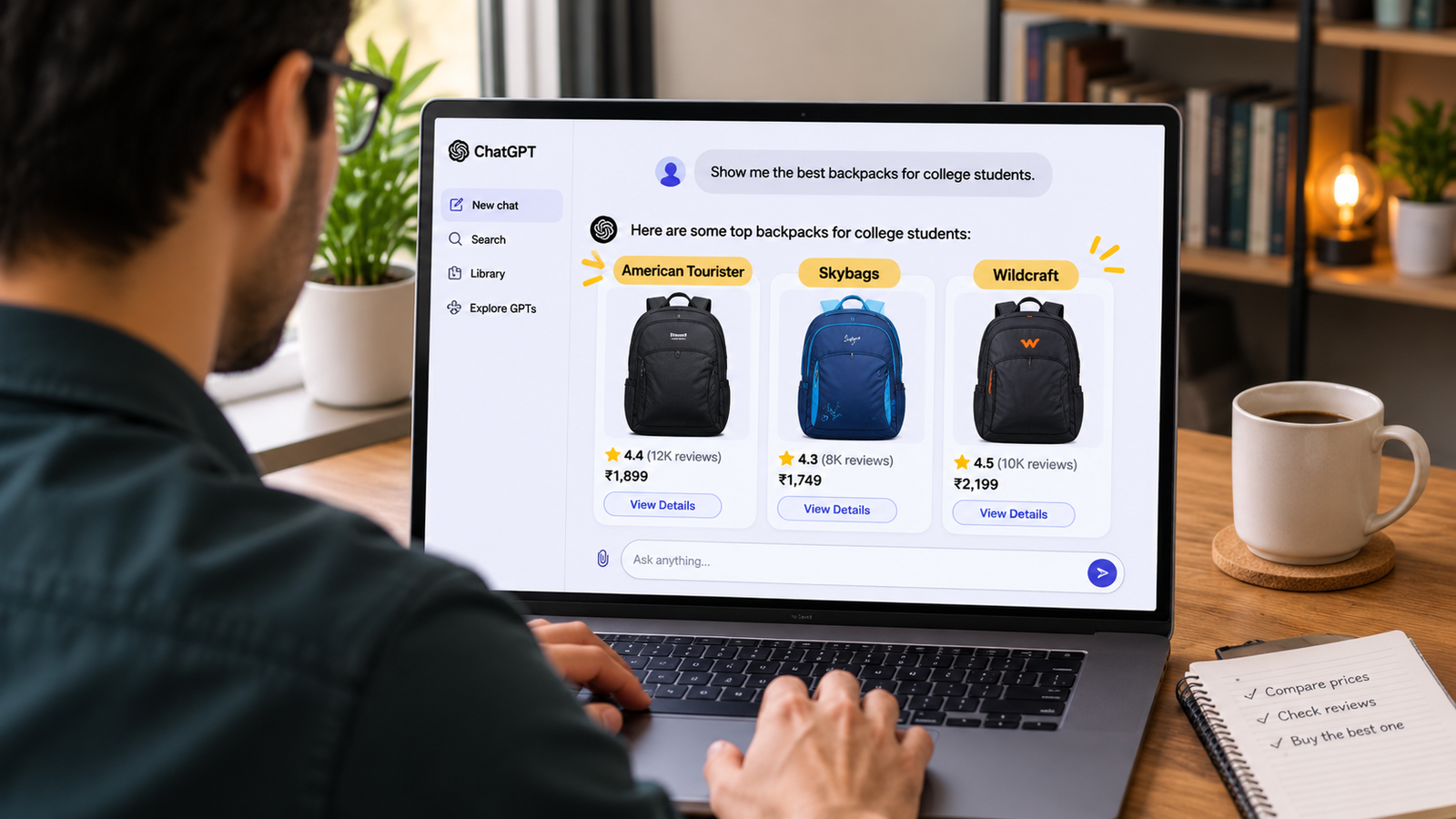
Try this. Open ChatGPT and type what a real customer might: “best lightweight backpack for a 16-inch laptop under $100 that survives a daily commute.”
You won’t get ten links. You’ll get three or four product names and a line or two on why each one made the cut. If you sell backpacks and you’re not on that list, the shopper never sees your homepage. Honestly, that stings a bit.
This guide is for Shopify owners and ecommerce marketers who want a plan, not a pep talk. We’ll cover how these assistants seem to pick products, which fixes are worth doing first, which advice you can safely ignore, and a 30-day schedule.
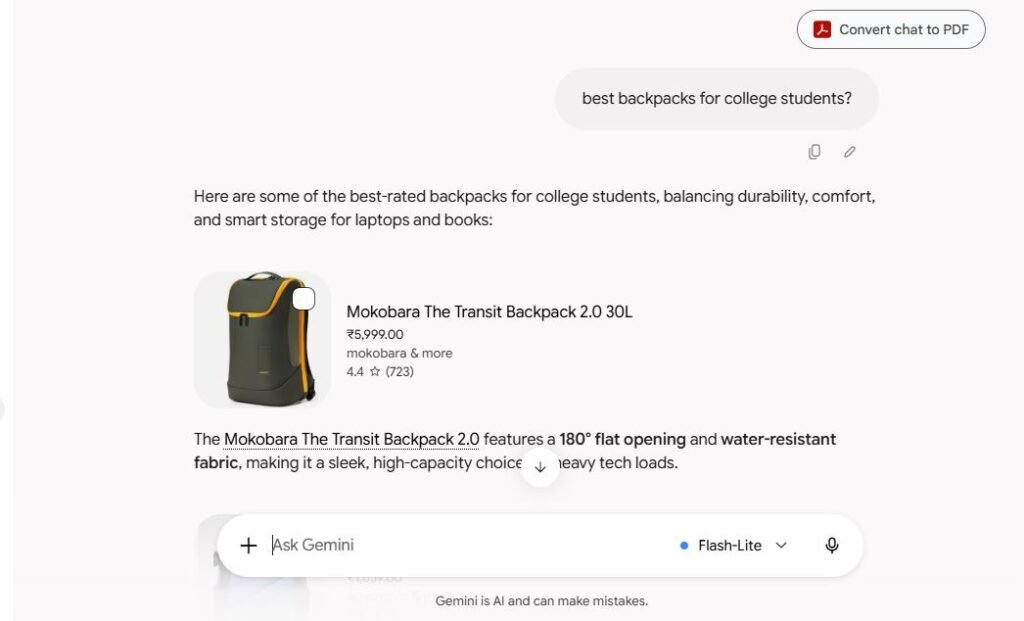
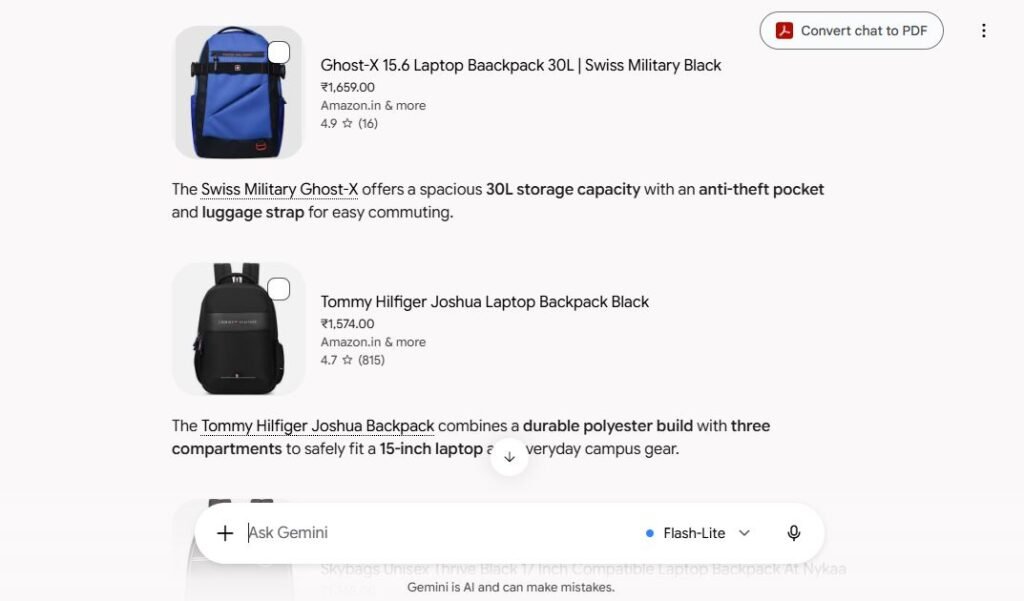
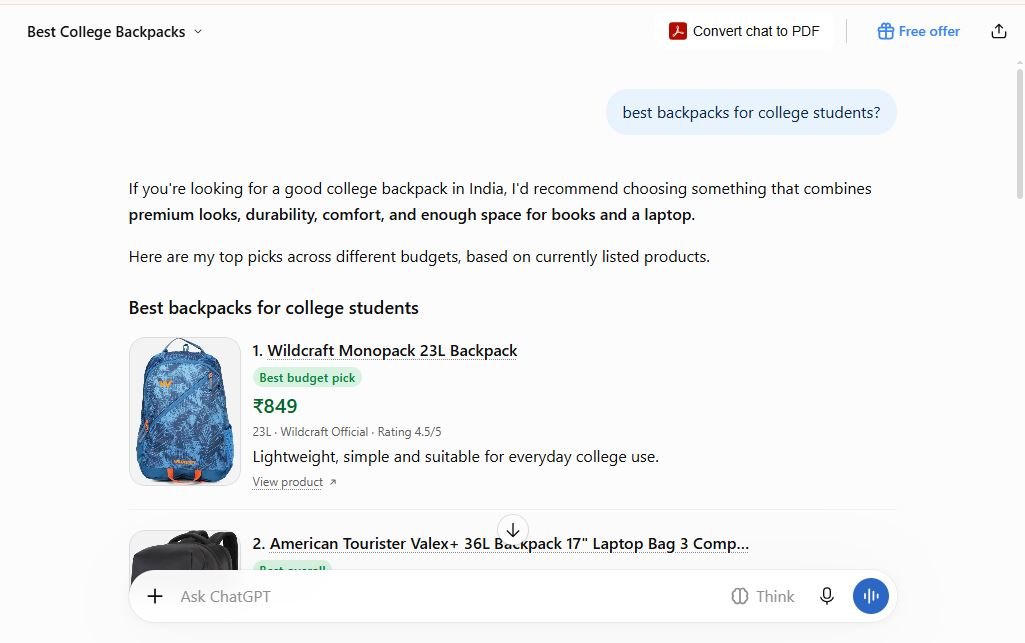
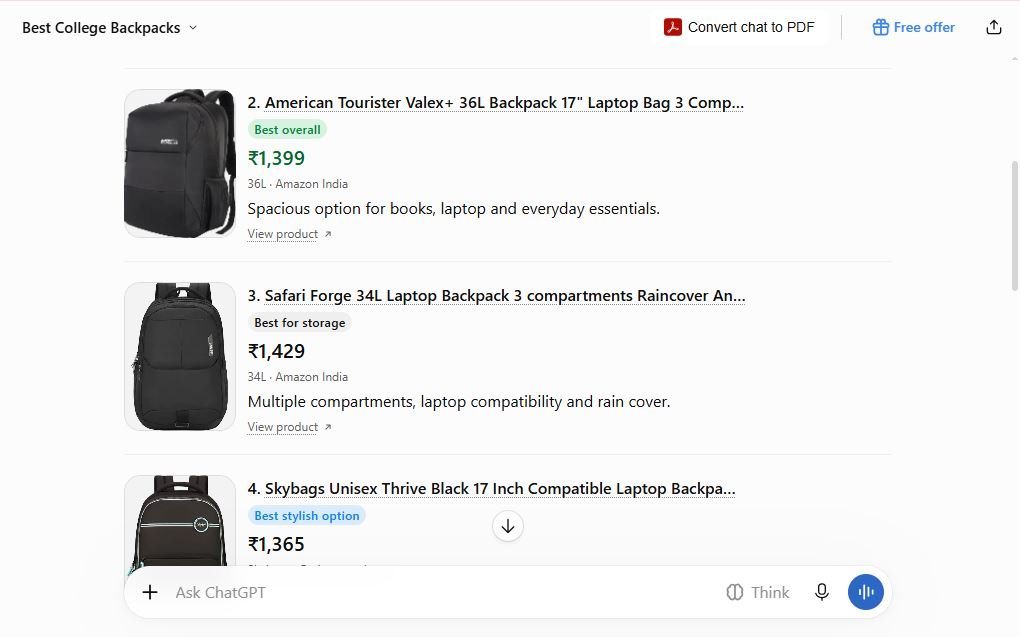
The first time I tested this, I asked Google, Gemini and ChatGPT the same question, “best backpacks for college students,” and got three almost completely different lists. Google’s top pick was a ₹20,000 Aer pack backed by blogs, Reddit and YouTube, while ChatGPT’s “best budget pick” was an ₹849 Wildcraft pulled from live marketplace listings, and only one product, the Skybags Thrive, showed up in more than one tool.
In a hurry? Let the right bots in. Put real specs on every product page. Keep your schema and feeds honest. Answer the questions people actually ask. Then test it every month.
What Is AI SEO for Ecommerce?
AI SEO for ecommerce means improving your store’s crawlability, product data, content and reputation so AI assistants can find your products, understand them and recommend them to the right shoppers.
You’ll also see it called GEO (generative engine optimization) or AEO (answer engine optimization). Different labels, same job: become a source an assistant feels safe quoting.
There are two goals, and people tend to remember only the first. Yes, you want to get named. But you also want to get described correctly. An assistant that recommends your jacket and quotes last season’s price, or the wrong fabric, can do more damage than being left out.
How AI Assistants Decide What to Recommend
Nobody outside these companies knows the exact recipe, and it differs from one assistant to the next. If someone is selling you a secret formula, walk away.
What we can say is that the pattern looks similar across tools. The assistant splits the question into pieces, pulls in pages and product data for each piece, then writes an answer from whatever it found. To make it through, your product has to clear three hurdles.
Hurdle | What the assistant needs | Where you fix it |
|---|---|---|
Can it reach you? | Pages it’s allowed to crawl and can read | robots.txt, firewall, theme, apps |
Can it verify you? | Specific, consistent product facts | Product pages, schema, feeds |
Does anyone back you up? | Reviews, roundups, forum and video mentions | Reviews, PR, community |
Most stores trip on the first two without knowing it. Oddly, that’s good news, because both can be fixed in a few weeks.
AI SEO vs Traditional Ecommerce SEO
Google says its AI features rest on the same foundations as normal Search: your page has to be indexed and eligible for a snippet, and there’s no extra requirement on top. So traditional SEO isn’t dead. It’s the entry ticket.
What shifts is the emphasis. Shoppers ask longer questions with budgets and constraints baked in. Being named in an answer can matter even when nobody clicks. Reviews, forums and roundups often carry more weight than your own copy. And your product facts now have to agree across your site, your feed and your marketplace listings.
If your basic SEO is shaky, fix that first. AI visibility won’t rescue a slow, thin store.
Step 1: Let the Right Crawlers In
This is the step most stores skip, and it can quietly cancel everything else you do.
AI companies run separate bots for separate jobs. Some gather training data. Others fetch pages live to answer a question. That split matters, because you can opt out of training and still show up in answers. Block the wrong bot and you get the opposite of what you meant.
Bot | Run by | What blocking it does |
|---|---|---|
GPTBot | OpenAI | Opts you out of model training |
OAI-SearchBot | OpenAI | Can keep you out of ChatGPT search answers |
ClaudeBot | Anthropic | Opts you out of training |
Claude-SearchBot | Anthropic | Can keep you out of Claude’s search answers |
PerplexityBot | Perplexity | Can keep you out of Perplexity answers |
Google-Extended | Limits Gemini use; doesn’t change Google Search | |
Googlebot and Bingbot | Google, Microsoft | Feed Google’s AI features and Bing-powered assistants |
Names and policies change, so check each company’s crawler documentation before you touch anything.
On Shopify, look in three places. First, yourstore.com/robots.txt: make sure you haven’t disallowed the search bots above (Shopify lets you customize the file through robots.txt.liquid). Second, your firewall or CDN. Cloudflare changed its defaults in 2025 to block many AI crawlers, so if you use it, check rather than assume. Third, your apps. Review, FAQ and size-guide apps often load their content with JavaScript, and studies of AI crawlers have found that many of them don’t run it. Your best reviews might be invisible to them.
Here’s a two-minute test. Open a product page, right-click, and choose View Page Source (not Inspect). Search for your price, one review and one FAQ answer. Can’t find them? Assume most AI crawlers can’t either.
Step 2: Put Real Facts on Every Product Page
Assistants match products to questions using facts. Adjectives give them nothing to hold on to.
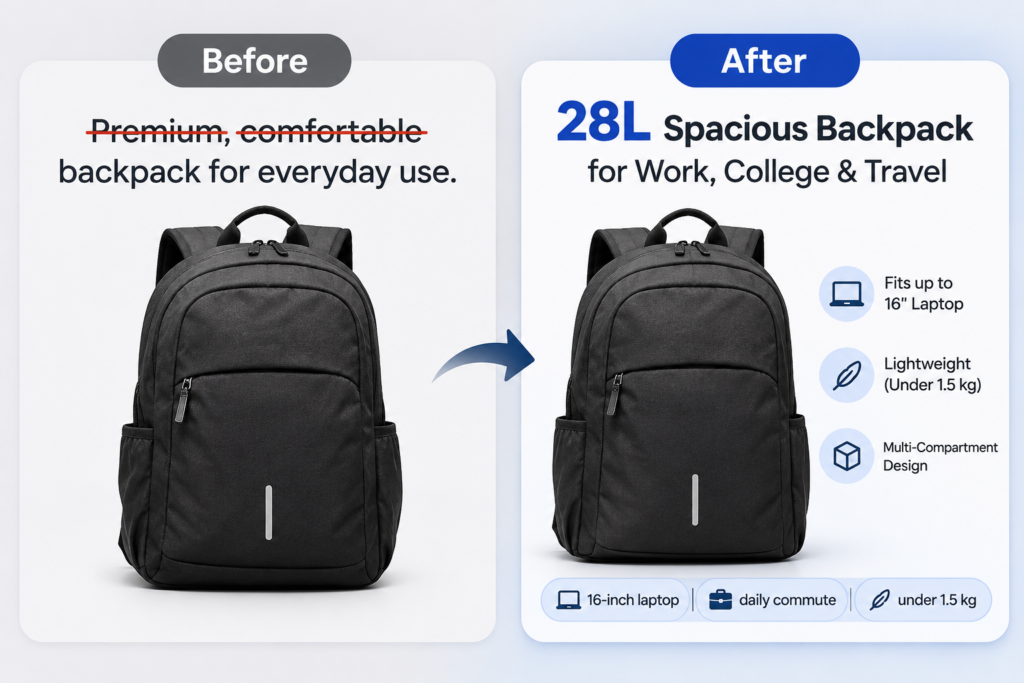
Compare these two descriptions:
“Premium, comfortable backpack for everyday use.”
“28L backpack, 1.1 kg, water-resistant 600D polyester, padded sleeve for laptops up to 16 inches, YKK zips, 2-year warranty. Built for daily commuters and short business trips.”
Only the second can be matched against “16-inch laptop” or “commute.” The first reads nicely and says nothing.
At minimum, state these as plain text on the page: the exact name and model, size, weight and materials, who the product is for (and who it isn’t), what’s in the box, compatibility, warranty, shipping times, the return window, and a price that matches your feed.
On Shopify, metafields are a tidy way to store specs like dimensions or materials. Just make sure they actually display. A metafield that never reaches the visible page does little for shoppers or crawlers. And don’t lock specs inside images.
One habit that feels backwards: say what the product isn’t for. “Not suitable for laptops above 16 inches” makes a page more believable, and easier to quote.
Step 3: Keep Your Schema Accurate, Not Fancy
Honest position first. Google says structured data isn’t required for its AI features, and there’s no special schema.org markup for AI. It also says your markup should match the visible text on the page.
So why bother? Because Product markup still supports rich results and helps systems read your price, availability and reviews correctly. Think of it as hygiene, not a growth hack.
For Shopify, include the name, brand, image, description, price, currency, availability, and a GTIN or MPN if you have one. Add rating data only if the reviews are really on the page. Add shipping and return details where your theme or app supports them. Use ProductGroup markup to tie size and colour variants together instead of treating each as a separate product.
The classic Shopify problem is duplication. Your theme outputs Product markup, then a review app adds its own, then an SEO app adds a third. They disagree, and one of them still shows the pre-sale price. Test a handful of product URLs in Google’s Rich Results Test, clear out the duplicates, and recheck after every price change.
Step 4: Treat Your Product Feed Like a Search Channel
For shopping answers, your feed can matter as much as your pages.
Shopify’s documentation describes merchants becoming discoverable in ChatGPT, Microsoft Copilot, AI Mode in Google Search and the Gemini app through Agentic Storefronts. You manage those channels in the Shopify admin under Sales Channels. Eligibility and checkout options vary by channel and by where your buyers are. Shopify lists ChatGPT availability for merchants who sell to US buyers, for example, so if you’re based in the UK or India, check what actually applies to you.
Whatever your region, one rule holds: the same product should look the same everywhere. Same title and model name on your site, in Google Merchant Center and on marketplaces. Same price and stock status in every channel. Same GTIN wherever you list it. Complete attributes like colour, size and material.
If your site says $99 and your feed says $119, an assistant has no reason to trust either number.
Step 5: Write Pages That Answer Buying Questions
Shoppers ask four kinds of questions: use-case (“best running shoes for flat feet”), budget (“laptop for video editing under $1,000”), constraint (“moisturizer for sensitive skin without fragrance”) and comparison (“Brand A vs Brand B for beginners”). Build pages for each.
Start with your collection pages. On most Shopify stores they’re a title and a grid of products, which gives an assistant nothing to quote. Add a short answer block at the top that still makes sense if it’s lifted out on its own:
“Our carry-on backpacks suit travellers who need one bag for a laptop and three days of clothes. They range from 20L to 35L, weigh 0.9 to 1.4 kg and fit most airline cabin limits. Choose 20–25L for commuting, 30–35L for weekend trips.”
Then add a short buying guide, a comparison table of your own products as real text, and FAQs built from questions customers genuinely ask.
Where do those questions come from? Your support inbox and product reviews are the best source. After that, try Google Search Console queries that start with “how,” “what,” “which” or “best,” the People Also Ask boxes, and Reddit threads in your category.
Write fair comparison pages. Say where a competitor is the better pick. It sounds risky, but pages that admit trade-offs are easier for shoppers and assistants to trust. And put a visible “last updated” date on guides, then actually update it when prices, ranges or specs change.
Step 6: Earn Reviews and Mentions Beyond Your Own Site
Your own copy tells assistants what you say. Reviews and independent sources tell them whether it’s true.
Start by asking better questions. “How did it fit?” gets you a useful review. “Leave us a review” gets you five stars and nothing else. Then look outward: send writers who cover your category clear specs and a sample, back the video reviewers who already cover your niche, and keep your marketplace listings complete and consistent with your site. On Reddit and forums, say who you are and answer the question even when the honest answer isn’t your product.
Don’t fake any of it. Google’s own guidance suggests that chasing inauthentic mentions isn’t as useful as it looks, and fake reviews can wreck trust for years.
Step 7: Test It With a Fixed Set of Prompts
Rankings alone no longer tell you whether you’re visible, so build a simple test.
- Write 30 prompts a real customer might ask: category, budget, use-case, constraint and comparison questions, plus a few that name your brand.
- Run them in ChatGPT, Gemini or Google AI Mode, Perplexity and Copilot, using a logged-out or fresh session.
- Run each prompt about three times. Answers change from run to run, so a single answer is only a sample.
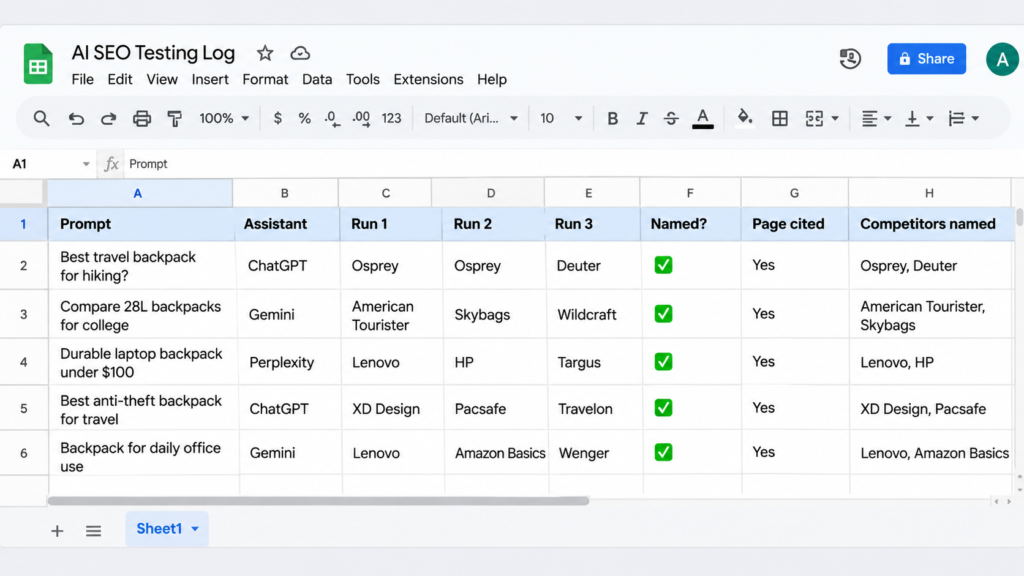
- Record whether you were named, which of your pages was cited, which competitors showed up, and whether the details were right.
- Repeat monthly with the same core prompts, or the trend means nothing.
Check your analytics too, for visits from chatgpt.com, perplexity.ai, gemini.google.com and copilot.microsoft.com. Attribution will be messy, because plenty of shoppers discover a product in an assistant and buy later through Google or a direct visit. Treat the numbers as a trend, not a ledger.
For one store and one category, a spreadsheet is plenty.
What to Skip
A few things get far more attention than they deserve.
There’s no “AI schema.” Google says there’s no special markup for its AI features, so keep your Product markup accurate and move on. The same goes for llms.txt: Google says it isn’t needed for its AI features. Adding one is harmless, but your product pages deserve the time first.
Skip stuffing phrases like “best product for AI search” into pages. It adds no facts and reads badly. Skip fake reviews and paid mentions dressed up as organic ones. And don’t rewrite your whole catalog in one go. Start with your top 10 revenue products and your main collection pages.
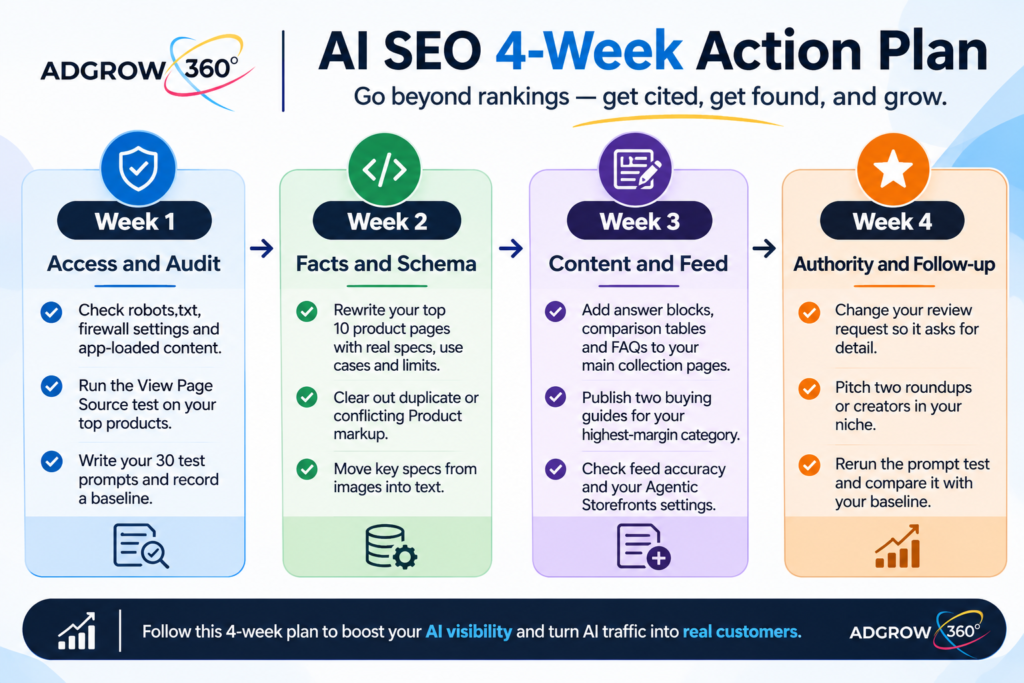
Your 30-Day Plan for a Shopify Store
Week 1: access and audit. Check robots.txt, firewall settings and app-loaded content. Run the View Page Source test on your top products. Write your 30 test prompts and record a baseline.
Week 2: facts and schema. Rewrite your top 10 product pages with real specs, use cases and limits. Clear out duplicate or conflicting Product markup. Move key specs from images into text.
Week 3: content and feed. Add answer blocks, comparison tables and FAQs to your main collection pages. Publish two buying guides for your highest-margin category. Check feed accuracy and your Agentic Storefronts settings.
Week 4: authority and follow-up. Change your review request so it asks for detail. Pitch two roundups or creators in your niche. Rerun the prompt test and compare it with your baseline.
Then repeat the test monthly and move on to the next category.
Common AI SEO Mistakes in Ecommerce
The usual ones: blocking search bots while trying to block training bots; showing prices, reviews or FAQs only after JavaScript loads; letting your site, feed and marketplaces show different prices; writing vague descriptions with no size, material or use case; treating AI SEO as a replacement for regular SEO; and tracking clicks while ignoring whether you’re named at all.
Frequently Asked Questions
What is AI SEO for ecommerce?
It’s the practice of making an online store easy for AI assistants to access, understand and trust, so its products can be recommended in answers from tools like ChatGPT, Gemini, Perplexity and Google AI Mode. It builds on regular ecommerce SEO and doesn’t guarantee recommendations.
How do I get my Shopify products recommended by ChatGPT?
There’s no guaranteed method. Allow search crawlers such as OAI-SearchBot, keep product facts complete and consistent across your site and feeds, check your Agentic Storefronts settings, and build genuine reviews and third-party mentions. Then test with real shopper prompts.
Does schema markup help AI recommendations?
Not on its own. Google says structured data isn’t required for its AI features and there’s no special AI schema. Accurate Product markup is still worth keeping because it supports rich results and clear product data, but it can’t fix thin pages.
Should I block AI crawlers on my store?
You can block training bots if you prefer, but think twice before blocking search bots. Bots like OAI-SearchBot and PerplexityBot are linked to showing your pages in answers. Check each company’s current documentation before changing robots.txt.
Is AI SEO different from regular SEO?
It’s built on it. Crawlability, helpful content, internal links and page quality still matter. What changes is the emphasis: detailed product facts, answers to long shopper questions, consistent data across channels, and reputation beyond your own site.
How do I know if AI search is sending me customers?
Check analytics for referrals from chatgpt.com, perplexity.ai, gemini.google.com and copilot.microsoft.com, and run a monthly prompt test to see whether your brand gets named. Many AI-assisted purchases finish later through other channels, so expect imperfect attribution.
Conclusion
AI assistants are changing where shoppers make up their minds, but the fix isn’t mysterious. Let the right bots in. Put real facts on every product page. Keep your markup and feeds honest and consistent. Answer the questions people actually ask. Earn reviews and mentions you’d be happy to show a customer. Then test, and test again.
If you’d like help turning this into a plan for your store, AdGrow360 runs AI SEO audits for ecommerce brands in the USA, UK and India. We’ll show where your products appear today, what AI assistants get wrong about them, and which fixes to make first.