by: adgrow360@gmail.com
-
July 15, 2025
-
Comments (0)
Local SEO agencies use Rapid URL Indexer to push new or updated pages, service-area landing pages, Google Business Profile-linked pages, blog posts, and freshly earned backlinks, in front of Google faster than a normal crawl would catch them. Instead of waiting days or weeks for Googlebot to stumble onto a change, the agency submits the URL through an indexing tool’s dashboard, API, or ping system, then checks whether Google actually adds it to the index. This matters most in local search because the payoff window is short: a new city page or an updated Google Business Profile only drives calls if it’s indexed while people are still searching.
Quick answer:
- What it does: Submits URLs directly to indexing tools instead of waiting for organic crawling to find them.
- Where agencies use it most: New location pages, GBP-linked landing pages, backlinks, content refreshes, and post-migration cleanup.
- What it can’t do: Guarantee indexing or rankings. Google still makes the final call on both.
- The 2026 catch: Google’s own Indexing API is officially restricted to job and livestream pages, so most “rapid indexing” for local SEO actually runs on sitemaps, internal linking, and third-party tools, not that API. More on this below.
What Is Rapid URL Indexer, Exactly?
“Rapid URL Indexer” gets used two ways in SEO conversations, and mixing them up is where a lot of confusion starts.
Sometimes it’s a category name, shorthand for any tool or process that pushes new URLs toward search engines faster than a natural crawl would. Other times it’s a specific product: Rapid URL Indexer, a paid indexing service at rapidurlindexer.com that agencies and link builders use to get pages and backlinks discovered by Google. This guide covers both, because most agencies use the term loosely to describe the whole approach, even when they mean one specific tool.
Mechanically, here’s what’s happening. Search engines find new content two ways: by crawling (following links or reading sitemaps until they land on a page) or by direct submission (someone tells the search engine a URL exists and asks it to look). Rapid indexing tools work the second way. They submit URLs in bulk through a mix of ping notifications, sitemap updates, and, where eligible, API calls, so discovery doesn’t depend on Google finding the page on its own schedule.
The tool at rapidurlindexer.com, for example, runs on a pay-per-indexed-URL model: you submit a batch of URLs, sometimes thousands at once, it works through crawl-triggering signals over the following days, and you get a report showing what actually made it into Google’s index, typically with credits refunded for anything that doesn’t within the guarantee window. No Search Console access is required, which is a big part of why it gets used for backlinks and citations that live on sites the agency doesn’t own.
Why Indexing Speed Is a Local SEO Problem, Not Just a Technical One
Indexing delays hurt every website, but local SEO feels it more sharply than most, for one reason: local intent is time-bound.
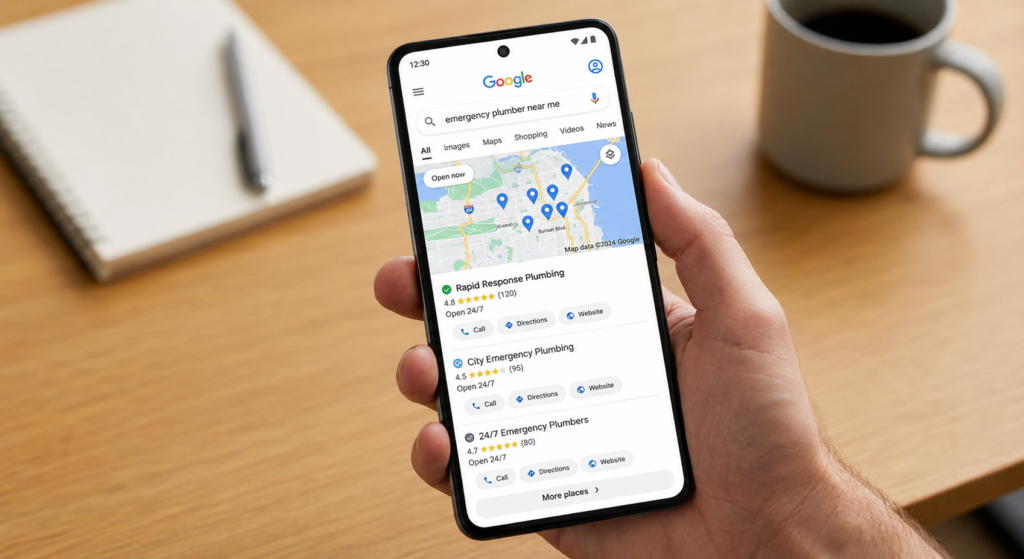
Someone searching “24-hour plumber near me” or “best brunch in the neighborhood” wants an answer today, not whenever Google’s crawler gets around to the page. If a business opens a new location, adds an emergency-service page, or updates a holiday-hours notice and that page sits unindexed for two weeks, the business hasn’t lost some abstract “visibility.” It’s lost the exact customers who were searching during that window, and they’ve likely already booked with a competitor who showed up.
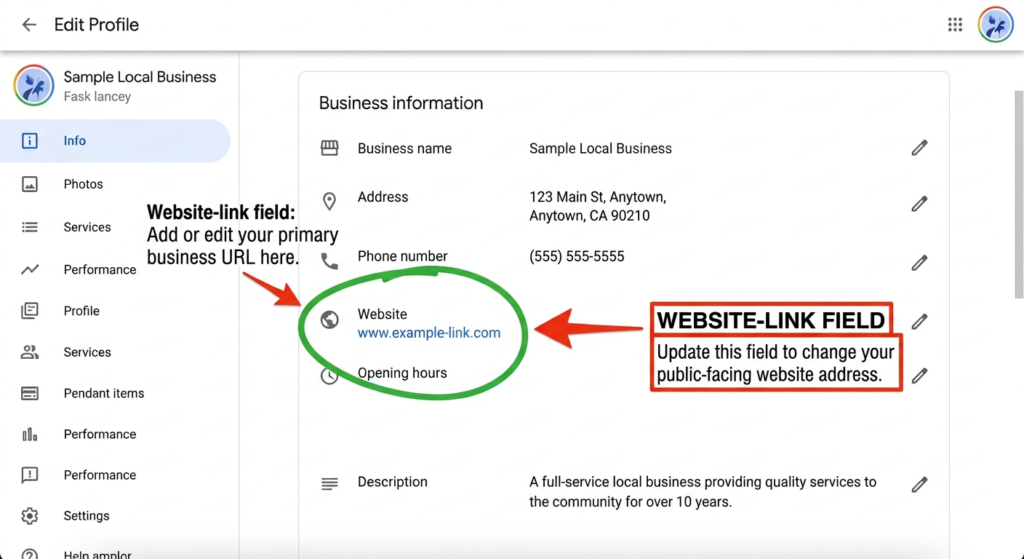
The Google Business Profile connection makes this sharper still. A GBP listing links to a website, and Google cross-checks that landing page for consistency and freshness. When the linked page is slow to index, or still shows outdated information because Google hasn’t recrawled it, that mismatch can quietly work against local pack rankings even if the GBP profile itself looks perfect.
Seasonal and promotional content compounds the problem. A limited-time offer, an event page, or a holiday menu might only be relevant for a few weeks. If natural crawling eats up half of that window just noticing the page exists, the content has done its job and disappeared before it ever had a chance to rank.
How Local SEO Agencies Actually Use Rapid URL Indexer
In practice, agencies don’t run every new URL through an indexer. They reserve it for pages where speed changes the outcome.
New Service-Area and City Pages
When an agency builds out location pages, say, “emergency plumber in Dallas” and “emergency plumber in Fort Worth“, it wants all of them live in Google’s index around the same time, not trickling in over weeks while competitors’ pages sit there uncontested. Bulk submission through an indexer closes that gap.
Google Business Profile-Linked Landing Pages
Every GBP listing points to a page on the client’s site. When that page gets a new phone number, a new service, or a seasonal call-to-action, agencies resubmit it for indexing so the update shows up in local search within hours instead of whenever the next natural crawl happens to occur.
Backlinks and Citations
This is arguably the most common use case, and the one general SEO advice tends to skip. A backlink only helps if Google has actually crawled and indexed the page it lives on. Agencies building citations, guest posts, or directory listings on sites they don’t control, and can’t submit through their own Search Console, use third-party indexers specifically because URL Inspection only works for properties you own.
Content Refreshes
When an old blog post or service page gets updated, new stats, new pricing, a rewritten intro, agencies resubmit it so Google re-crawls and re-evaluates the page sooner rather than waiting for Google to notice the change on its own timeline.
Post-Migration and Technical Fixes
After a site move, a URL structure change, or a batch of broken-link repairs, agencies use bulk indexing to get the corrected URLs back in front of Google quickly, shortening the period where rankings wobble during the transition.
A typical workflow looks like this: the agency triages which URLs actually need speed (not everything does), submits them through the sitemap, Search Console, and/or a third-party tool depending on who owns the property, then checks the Coverage report or the indexer’s own report a few days later to confirm what stuck, resubmitting anything that didn’t.
The Google Indexing API Reality Check (What Changed in 2025-2026)
Here’s where a lot of “rapid indexing” marketing gets ahead of itself, and where this guide is going to diverge from most of what’s already been written on this topic.
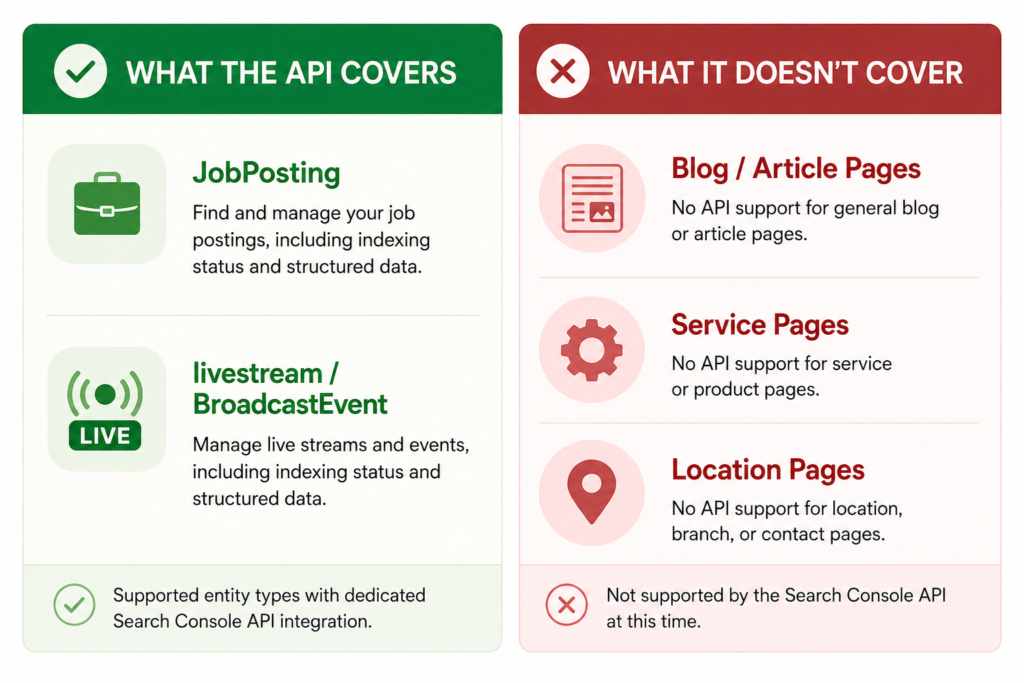
Google’s own Indexing API is real, it’s fast (often indexing within hours), and it’s completely free. The catch: Google restricts it, officially, to exactly two content types: pages marked up with JobPosting structured data, and livestream pages using BroadcastEvent inside VideoObject markup. That’s the whole list. Not blog posts. Not service pages. Not location pages. Google’s own developer documentation says this outright, and in May 2025 Google’s Search Relations team publicly reiterated that using the API outside those two categories violates its guidelines and risks having quota revoked. Reporting through mid-2026 suggests quota requests for non-compliant use have largely stalled since.
For years, plenty of SEO tools and guides recommended using the Indexing API for any URL anyway, and it often worked because Google didn’t enforce the restriction strictly. That’s changed.
Why does this matter for local SEO specifically? Because a plumber’s service page, a law firm’s city landing page, or a restaurant’s menu update is exactly the kind of content the API was never built for. If a tool’s marketing claims it uses “Google’s Indexing API” to instantly index local service pages, that claim is worth a second look, because on paper, it describes something Google’s own documentation says isn’t supported.
None of this is a reason to avoid rapid indexing. It’s a reason to understand what’s actually happening behind the scenes. Legitimate rapid-indexing tools rely on a mix of sitemap pinging, internal-linking signals, and crawl-triggering notifications, not a universal backdoor into Google’s index. IndexNow, for comparison, is a separate, open protocol that Bing, Yandex, Seznam, and Naver support; as of 2026, Google still hasn’t adopted it, so it helps with other search engines but doesn’t move the needle on Google indexing directly.
Indexing Methods Compared
Not every method fits every situation. Here’s how the main options stack up:
| Method | Cost | Typical Speed | Best For | Where It Falls Short |
|---|---|---|---|---|
| XML Sitemap | Free | Days to weeks | Whole-site baseline coverage | Passive, doesn’t prioritize urgent pages |
| Search Console URL Inspection | Free | Hours to a few days | A handful of your own urgent pages | Manual, one URL at a time, daily cap |
| Google Indexing API | Free | Hours | Job posting & livestream pages only | Not officially supported for blog, service, or location pages |
| IndexNow | Free | Hours | Bing, Yandex, Seznam, Naver | Google has not adopted the protocol |
| Third-party rapid indexer (e.g., Rapid URL Indexer) | Paid, per-URL or subscription | Hours to a few days | Backlinks, citations, and pages you don’t control; bulk local pages | No tool can guarantee Google will index a page |
No method here can guarantee indexing. Google still makes the final call based on its own quality thresholds, no vendor, free or paid, overrides that. What a good method actually buys is a faster, more reliable chance at being seen sooner.
The 80/20 Rule Applied to Local SEO Indexing
SEO borrows the 80/20 rule constantly, and it applies directly to indexing strategy, not just keyword or content planning.
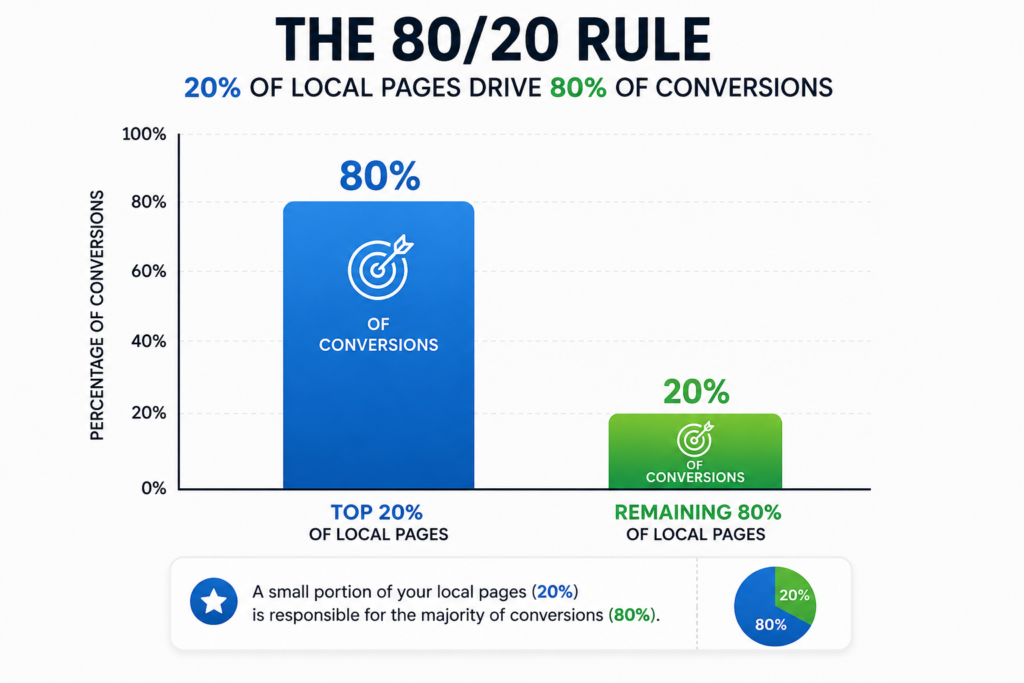
In most local SEO accounts, a small share of pages does most of the work: the homepage, the two or three highest-intent service pages, and the GBP-linked landing page typically drive the majority of local conversions. The other 80% of URLs (old blog posts, thin location pages, archive pages) contribute comparatively little.
That means rapid indexing shouldn’t be a blanket policy applied to every URL a site publishes. Agencies that get the most value from it apply the 80/20 lens first: identify the handful of pages where a faster index actually changes revenue (a new city page, a time-sensitive offer, a just-earned high-authority backlink), and reserve paid, bulk indexing tools for those. Routine content still goes through the free channels, since spending money and submission quota to rush a low-impact page is effort spent in the wrong 20%.
Best Practices for Using Rapid Indexing Tools Safely
- Prioritize before you submit. Not every new or updated URL deserves rapid indexing. Reserve it for pages where being found a week earlier actually matters.
- Keep sitemaps current regardless. Rapid indexing tools work alongside sitemaps, not instead of them. An outdated sitemap undermines everything else.
- Fix technical issues first. Submitting a broken, duplicate, or thin page for rapid indexing doesn’t fix the underlying problem, it just gets Google to notice the problem faster.
- Watch submission volume. Search engines watch for sudden, unnatural bursts of URL submissions. Spacing out bulk submissions tends to look more natural than one enormous batch.
- Verify, don’t assume. A “submitted” status isn’t the same as “indexed.” Check the Coverage report or the tool’s own verification report before deciding a page needs resubmitting.
- Pair indexing speed with content quality. Getting a thin or duplicate page indexed faster doesn’t help it rank. Indexing gets a page into the race; it doesn’t win the race.
Common Mistakes Local SEO Agencies Make With Rapid Indexing
Treating every page as urgent. When everything gets rushed through paid indexing, agencies burn budget on pages that would have ranked fine on a normal crawl schedule anyway.
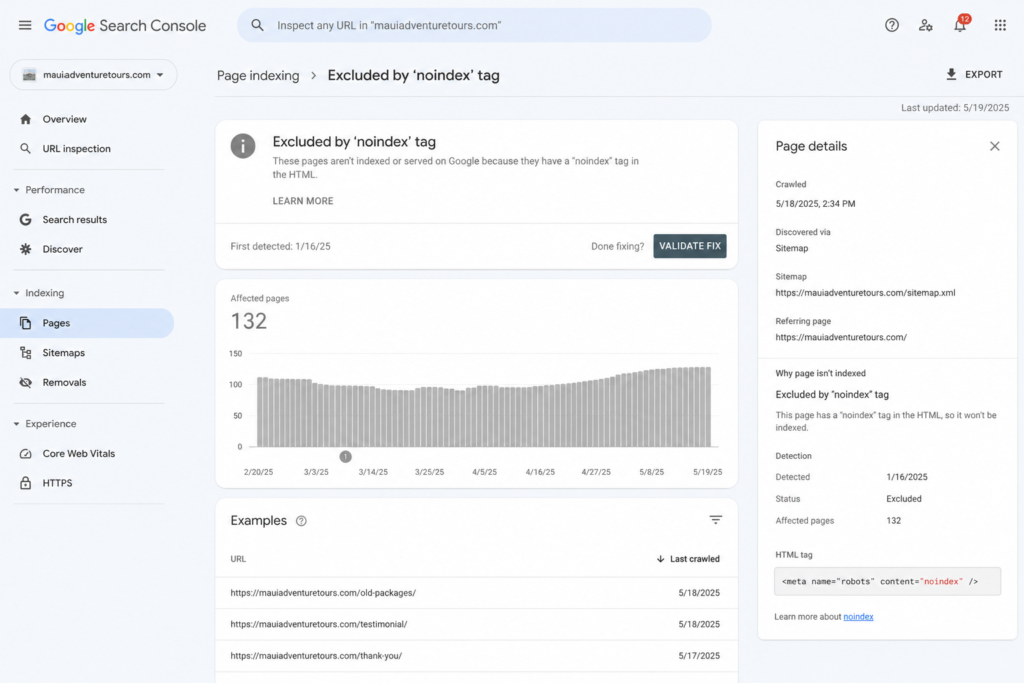
Ignoring the “why didn’t this index” step. A page that fails to index after submission is usually signaling a real problem, thin content, a canonical pointing elsewhere, an accidental noindex tag, not a fluke. Resubmitting without investigating just repeats the failure.
Assuming faster indexing means better rankings. Indexing and ranking are two different systems. A page can be indexed within hours and still rank on page four if the content, links, and relevance don’t hold up.
Mass-submitting low-quality backlinks. Using an indexer to force-feed a large batch of spammy or irrelevant backlinks into Google’s index doesn’t just waste credits, it can draw exactly the kind of attention a link profile doesn’t want.
Skipping the free channels first. Some agencies reach straight for a paid tool without confirming the sitemap is current, internal links point to the new page, and technical SEO basics are in order, steps that often solve the problem for free.
How to Choose an Indexing Tool
There’s no shortage of “best indexing tool” rankings online, and it’s worth knowing that a large share of them are published by the tools themselves or their affiliates. That’s not necessarily dishonest, but it does mean a #1 ranking on a random blog isn’t independent proof of anything. A more reliable approach is to evaluate against fixed criteria and test on a small batch before committing to a subscription.
Names that come up consistently across the local SEO and link-building space include Rapid URL Indexer, Omega Indexer, IndexMeNow, and GIGA Indexer, alongside Google’s own free routes (Search Console and sitemaps) for pages you own outright. What separates a tool worth paying for from one that isn’t:
| Criteria | Why It Matters |
|---|---|
| Verified reporting | Look for real before/after index-status checks, not just a “submitted” counter |
| Refund policy | Reputable tools refund credits for URLs that don’t get indexed within their stated window |
| Submission methods disclosed | Vague “proprietary technology” claims are harder to trust than tools that explain their process |
| GSC access required? | Some tools need Search Console access to your property; others (useful for backlinks you don’t own) don’t |
| Pricing model | Per-URL or credit pricing suits occasional bulk jobs; subscriptions suit agencies running this weekly |
For most small local businesses handling their own SEO, the free route, a clean sitemap plus Search Console’s URL Inspection tool, covers the majority of needs. Paid indexers earn their cost mainly on backlinks, citations, and third-party pages the business doesn’t control, where Search Console simply isn’t an option.
Frequently Asked Questions
What is the difference between crawling and indexing?
Crawling is Google discovering a page, usually by following a link or reading a sitemap, and downloading its content. Indexing is the separate step after that: Google analyzes what it crawled and decides whether to store the page in its searchable database. A page can be crawled without ever being indexed, for example, if it’s thin, duplicate, or blocked by a noindex tag. Crawling is necessary for indexing, but it doesn’t guarantee it.
How often will Google crawl my website?
There’s no fixed schedule. Crawl frequency depends on a mix of factors: how authoritative and popular the site is, how often its content actually changes, how large the site is, and how quickly the server responds. A high-authority news site might get crawled multiple times a day; a small, rarely updated local business site might see gaps of days or even weeks between visits. Search Console’s Crawl Stats report shows the real pattern for a specific site rather than a generic estimate.
How can I force Google to crawl my website?
You can’t force Google outright, no one can, but you can make a strong case for it. Submit an updated XML sitemap, use Search Console’s URL Inspection tool to request indexing on individual pages, build internal links pointing to the new or changed page, earn external backlinks, and keep the site technically clean (fast load times, no crawl errors, correct robots.txt rules). Publishing genuinely useful content on a regular schedule also encourages Google to check back more often.
What tool can I use to crawl a website for all URLs?
For a full technical crawl of your own site, Screaming Frog SEO Spider is the standard choice (its free version handles up to 500 URLs, which covers most small local business sites), alongside Sitebulb, Ahrefs’ Site Audit, and SEMrush’s Site Audit for larger builds. These are different from indexing tools: a crawler like Screaming Frog finds and audits every URL on a site, while indexing tools like Rapid URL Indexer try to get specific URLs discovered and added to Google’s index. Search Console’s Pages report, meanwhile, shows which of your URLs Google has actually indexed.
How do I submit a URL to Google Rapid URL Indexer?
Worth clarifying first: Google doesn’t run a product called “Rapid URL Indexer“, that’s a separate, third-party tool (rapidurlindexer.com). If that’s the tool in question, the process is straightforward: create an account, start a project, paste in the URL or URLs (bulk submission is supported), and submit; an indexing report follows over the next several days. If the goal is actually submitting a URL to Google itself, the official route is Search Console: open the URL Inspection tool, paste in the URL, and click “Request Indexing.“
Is Google indexing free?
Yes, indexing directly through Google costs nothing. Submitting a sitemap or requesting indexing through Search Console’s URL Inspection tool is entirely free, and always will be, Google has never charged for indexing. What paid tools charge for is the service around getting noticed faster (submission workflows, bulk processing, ping networks, reporting), not indexing itself.
Which URL indexer is the best?
It depends on what’s being indexed. For pages on a site the business owns, Search Console plus a clean sitemap is free and handles most cases without needing a third-party tool at all. For URLs the business doesn’t control, backlinks, citations, guest posts, directory listings, a paid indexer earns its cost, since Search Console only works for verified properties. Within that paid category, evaluate tools on verified success rate, refund policy, and transparent reporting rather than trusting a single “best of” ranking.
Which backlink indexing software is best for rapid URL indexing?
There isn’t one universal answer, it depends on submission volume, budget, and how much reporting detail matters. Rapid URL Indexer, Omega Indexer, IndexMeNow, and GIGA Indexer all come up repeatedly in the backlink-indexing space. Worth knowing: many of the “best backlink indexer” comparison articles online are published by the tools themselves or their affiliates, so treat rankings as a starting point, not a verdict, and test a small batch before buying a larger package.
What is the 80/20 rule in SEO?
The 80/20 rule, borrowed from the Pareto principle, is the observation that roughly 80% of results (traffic, conversions, rankings) tend to come from about 20% of the effort, pages, or keywords involved. In SEO, that usually means a small set of high-intent pages or keywords drives most of the value, so it makes more sense to concentrate effort, including rapid indexing budget, on that vital 20% than to spread it evenly across everything a site publishes.
Can I do local SEO myself?
Yes, the fundamentals are genuinely doable without an agency: claiming and optimizing a Google Business Profile, keeping name, address, and phone number consistent across directories, collecting and responding to reviews, and building a couple of solid location pages. Where it gets harder to DIY is the ongoing side, content, link building, technical monitoring, indexing checks, competitor tracking, which is usually why businesses bring in outside help once the basics are handled and they want to keep scaling.
How to optimize local SEO?
The core checklist: a fully completed and regularly updated Google Business Profile, consistent NAP details everywhere the business is listed, dedicated location or service-area pages, local backlinks and citations from relevant sources, a steady flow of genuine reviews, LocalBusiness schema markup, a mobile-friendly and fast-loading site, and, tying back to this whole guide, making sure new or updated pages actually get indexed quickly instead of sitting invisible for weeks. For the full picture beyond indexing, see what SEO covers as a complete discipline.
The Bottom Line
Local SEO agencies use Rapid URL Indexer, and rapid indexing tools generally, to close the gap between publishing something and Google actually noticing it: new city pages, GBP-linked landing pages, fresh backlinks, and time-sensitive offers all lose value the longer they sit unindexed, and local search punishes that delay faster than almost any other niche because local intent is immediate.
The tools genuinely help, but they work best as a targeted layer on top of solid fundamentals, not a replacement for them. A clean sitemap, healthy internal linking, and a technically sound site still do most of the heavy lifting for free; rapid indexing earns its cost on the pages where speed has real dollar value, particularly backlinks and citations that live outside the business’s own Search Console. And despite what some tool marketing implies, Google’s own Indexing API still isn’t built for local service pages, so it pays to know what’s actually happening behind a “rapid indexing” claim before relying on it.
Get the priorities right, index the vital 20% first, and speed stops being a gamble and starts being a repeatable part of the local SEO workflow.
Want a local SEO team that already accounts for all of this, indexing included? Get in touch with AdGrow360.
how do local seo agencies use rapid url indexer
how do local seo agencies use rapid url indexer
how do local seo agencies use rapid url indexer
how do local seo agencies use rapid url indexer
how do local seo agencies use rapid url indexer
how do local seo agencies use rapid url indexer
how do local seo agencies use rapid url indexer
how local seo agencies use rapid url indexer
rapid indexing for local seo
google indexing api local seo
instant indexing seo tools
bulk url indexing tools
seo indexing services
local seo fast indexing
url indexing for local business
rapid indexing tool for google
fast indexing google business profile
speed up google indexing
seo tools for rapid indexing